How to grow an online community that B2B buyers find, join and stay in
Key takeaways
- In a 2026 Hivebrite and Wonderly survey, 76.9% named events the top participation driver. Discussion forums scored 37.4%.
- Answered threads and opt-in member profiles are pages strangers search for. Make the ones that match the community's job public.
- Seed 20 to 30 operators before chasing volume, and watch activation rather than sign-ups.
- 53.7% of community teams do not compare members with non-members. Start with retention, expansion, acquisition and support cost.
- Worked example: $2,000 a month turning threads into public pages pays back in 2 months.
Many B2B communities stall after launch. The founders' network joins in the first 90 days, the launch posts stop working, and the threads slow down. In a 2026 survey by Hivebrite and Wonderly of 186 marketers, community managers and executives, 76.9% said events are the single biggest driver of meaningful participation. Discussion forums came in at 37.4%.
I read that gap as an opening. If you want to know how to grow an online community past the launch plateau, stop treating it as a chat room and start treating it as a B2B community with its own acquisition engine. Answered threads and member profiles are pages. Pages get found. People who find them arrive already knowing what they are joining.
This playbook covers where new members come from, six moves I use with B2B communities, a comparison of acquisition channels by cost and risk, and the payback math to bring to your CFO.
Quick Navigation
- Why online communities stall after launch
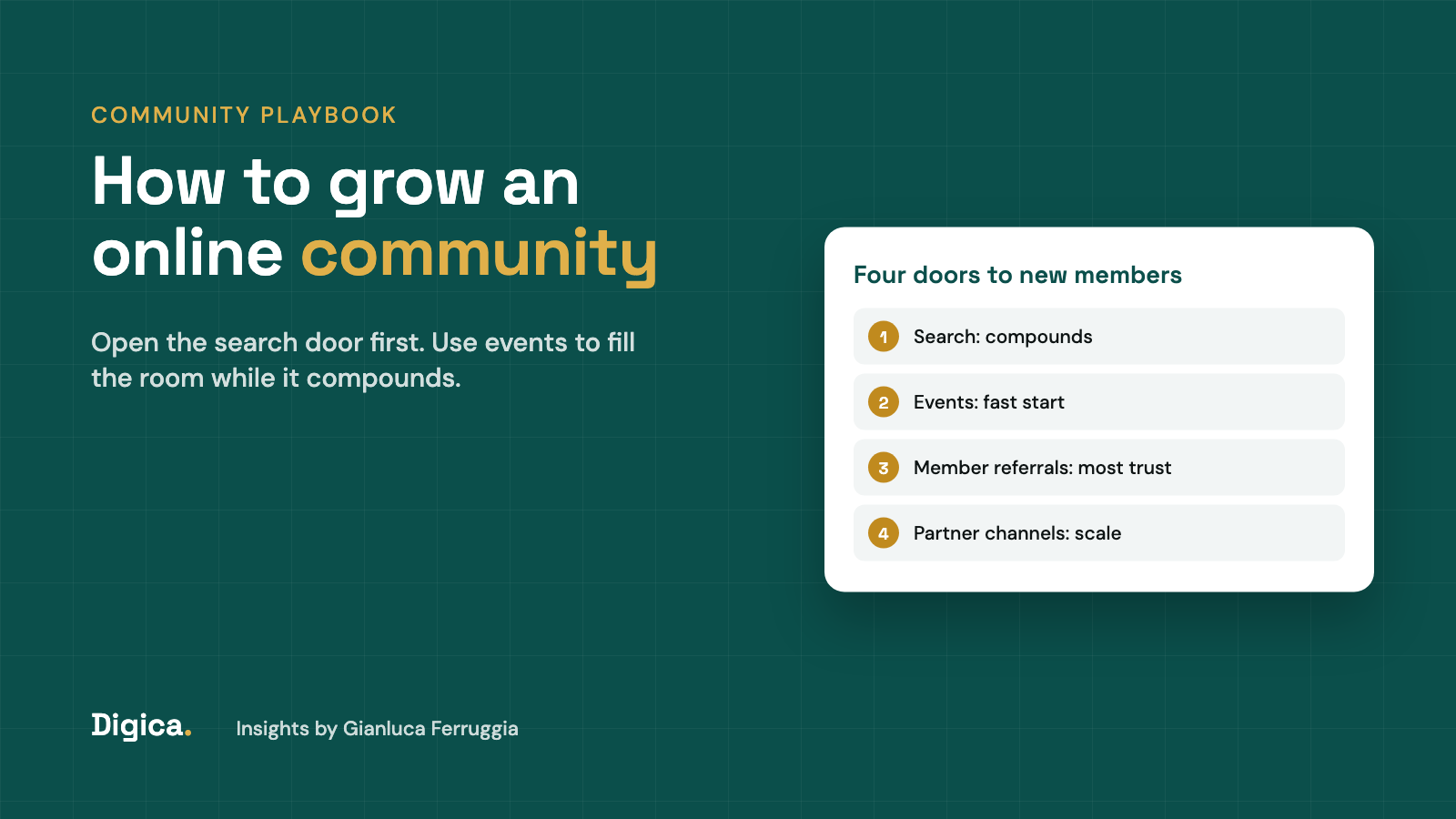
- Community member acquisition: the four doors
- Step 1: Give the community one job
- Step 2: Turn answered threads into public pages
- Step 3: Make member profiles worth finding
- Step 4: Use events to recruit and threads to retain
- Step 5: Seed with operators before you chase volume
- Step 6: Measure members against non-members
- How to grow a B2B community: channels compared
- The payback math for community growth
- FAQ
- Related Articles
Why online communities stall after launch
Launch growth is borrowed growth. The first members come from the founders' contacts, a newsletter list, a product user base or a launch post. That pool is finite. Once it is used up, growth depends on strangers finding the community on their own, and most B2B communities give strangers nothing to find.
I see three reasons this happens again and again.
- Everything valuable sits behind a login. The best answers, the member directory and the event recordings are locked. A searcher, an AI assistant or a curious buyer sees a sign-up wall and a homepage.
- The community has no single job. "A place for revenue leaders to connect" is not a reason to join. "Get a vetted answer on pricing a usage-based plan within 24 hours" is.
- Teams measure activity, not outcomes. Posts, likes and daily actives tell you the room is busy. They do not tell you whether members renew, buy or stay longer than people who never joined.
The goals community teams set make the third point worse. In the same Hivebrite and Wonderly survey, 56.5% named stronger relationships and trust as their single most important goal, and only 5.4% named revenue influence. Trust is a fine goal. It is also hard to fund when the budget review comes round, and it does not tell you which channel brings the next thousand members.
Community member acquisition: the four doors
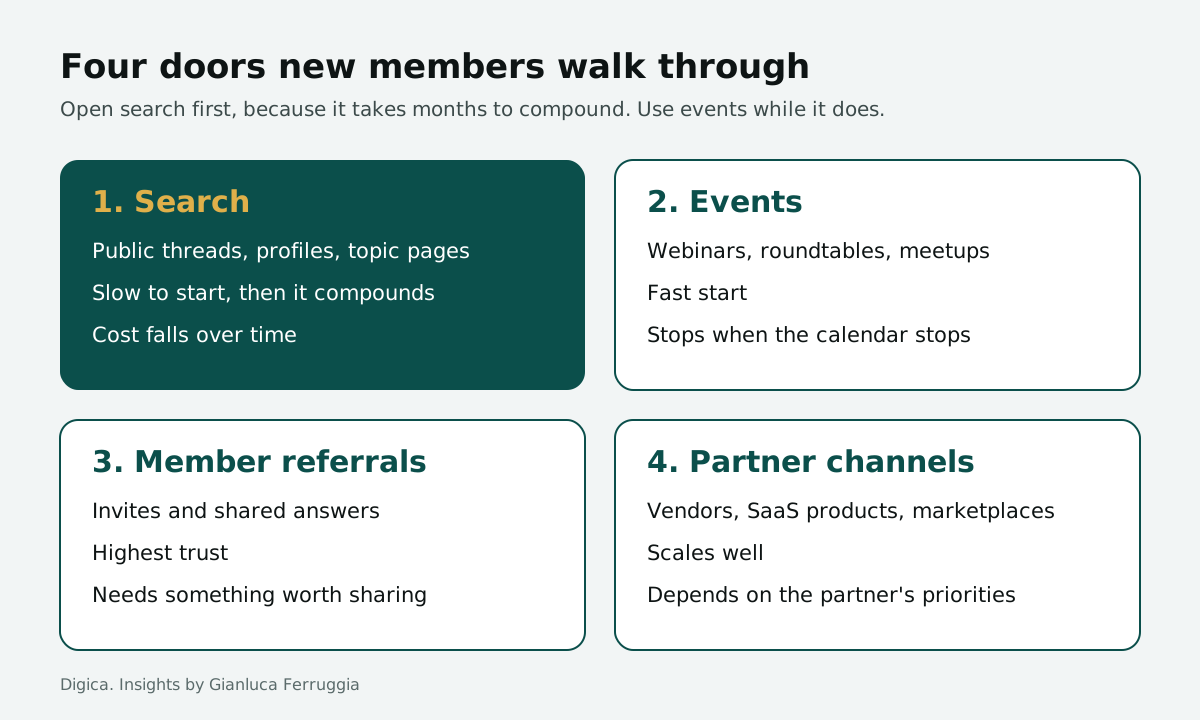
New members walk through one of four doors. Each one has a different cost, a different speed and a different ceiling.
- Search. Someone types a question, lands on a public thread or profile, and joins to ask a follow-up. Slow to start, then it compounds, because every answered thread is another page that can be found.
- Events. A webinar, a roundtable or a meetup pulls in people who would never browse a forum. Fast, but it stops the day the events stop.
- Member referrals. A member shares an answer or invites a peer. This is the highest-trust door, and it only opens when members have something worth sharing.
- Partner channels. A vendor, a SaaS product or a marketplace sends its users to the community from inside its own product or onboarding. It scales well and depends on the partner's priorities.
Most communities run on doors 2 and 3 and leave door 1 shut. That is the expensive way round. Events and referrals are excellent at bringing people in once. Search is the only door that keeps bringing people in from the work you already did last year, which is why community SEO is where I start with most B2B communities.
Want search to bring you members every month?
We map which threads, profiles and topic pages in your community should be public, and build the pages that turn searchers into members.
The order matters too. Open door 1 first, because it takes months to compound. Use door 2 to fill the room while it does. Doors 3 and 4 follow once members and partners have content worth pointing at. A community that opens all four at once usually spreads a small team too thin and ends up running a busy calendar with an empty forum underneath it.
Step 1: Give the community one job
Before you invest in any channel, write down the one job the community does for a member. One sentence a stranger understands on first read. Good examples sound like a promise with a deadline or an outcome: "a vetted answer from a peer who has done it," "the price other buyers paid," "an intro to three vendors who ship to your region."
The job decides everything downstream. It tells you which threads deserve to be public, which profiles matter, which events to run and who to invite first. It also gives a searcher a reason to join instead of reading one answer and leaving.
A useful test: read your current community homepage as a stranger. If you cannot tell within five seconds what you would get by joining that you cannot get on LinkedIn or Reddit, the job is not clear yet. Fix that before you spend on growth, because every channel converts worse when the promise is vague.
For B2B communities, the strongest jobs usually sit close to a buying decision: choosing a vendor, pricing a service, hiring a specialist, passing an audit. Those are the questions people search for, and the answers are the pages that bring them in.
Step 2: Turn answered threads into public pages
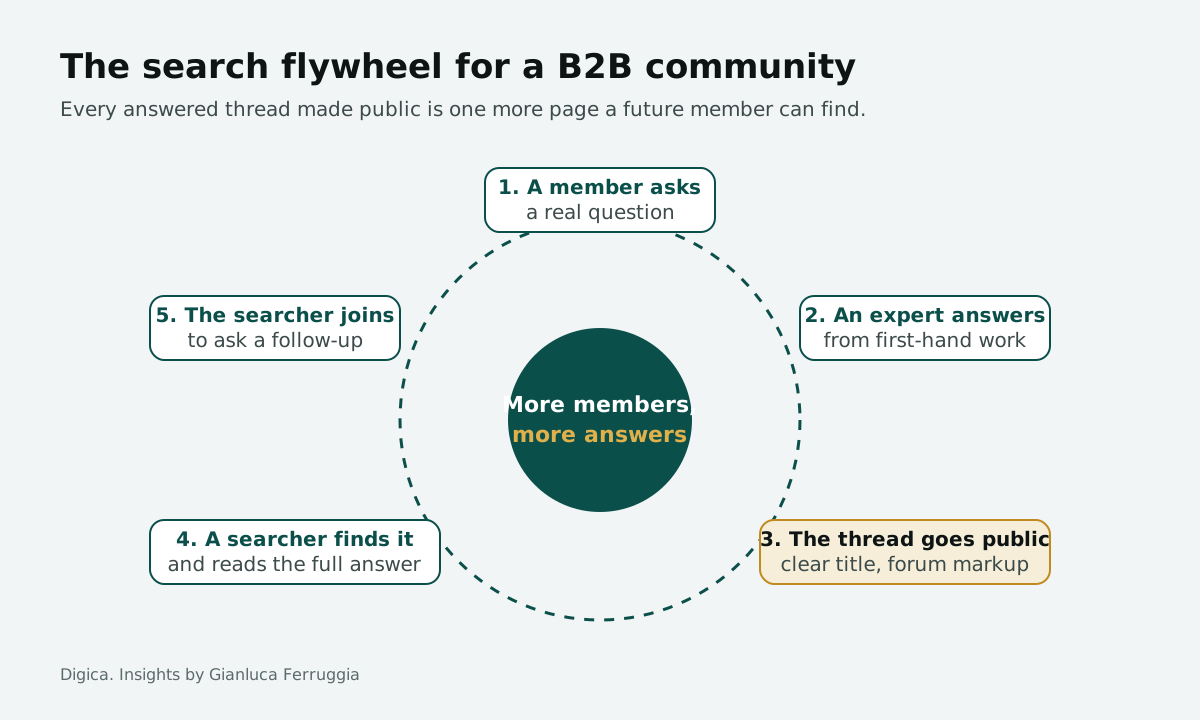
Your answered threads are the cheapest content you will ever own. A member asked a real question, a peer with first-hand experience answered it, and the wording matches how people search. The only thing missing is that nobody outside can see it.
Pick the threads that match the community's job and make them public, with the member's consent and a clear title. Then give each one the structure search engines expect. Google's discussion forum structured data documentation says the markup "is designed for any forum-style site where people collectively share first-hand perspectives." Its required properties are the author, the date published and the post content, and it recommends interaction statistics such as replies and upvotes.
Three rules keep this from turning into thin content.
- Publish answered threads, not open questions. A question with no reply is a dead end for a searcher.
- Edit the title, not the answer. Rewrite "quick question re: pricing" into the question people actually search for. Leave the expert's words alone.
- Group threads into topic pages. A page that collects the ten best threads on vendor pricing beats ten loose threads. It works like a category page on a marketplace, and the same rules apply as in category page SEO for marketplaces.
Keep the conversation itself open where you can. A thread a searcher can read in full earns trust. A thread that cuts off after two lines and asks for a sign-up mostly earns a bounce.
Step 3: Make member profiles worth finding
Member profiles are the second asset most communities waste. A profile with a name, a photo and a job title is a thin page. A profile that shows what the member has answered, which topics they know and what they have shared is a page people search for, especially in B2B, where buyers look up the person before they take the call.
When I was General Manager at DesignRush, we grew a B2B agency marketplace to 40,000+ listed agencies and over a million monthly organic visitors. The lesson I took from that is simple: a profile is a page someone looks up, so it has to answer the question they arrived with. The same holds for a community member directory.
Give members a reason to complete their profile: visibility in the directory, credit for accepted answers, a badge tied to the community's job. Make the profile public only when the member opts in. Then link profiles from the threads they answered, so the expertise and the person reinforce each other.
Profiles also feed the referral door. A member with a strong public profile shares it, and every share is a small advertisement for the community that hosts it. That is a growth loop you do not have to pay for each month.
Step 4: Use events to recruit and threads to retain
Events are the door community teams already trust, and the data backs them. In the Hivebrite and Wonderly survey, 76.9% named events as the biggest driver of meaningful participation, ahead of peer-to-peer support at 40.8% and forums at 37.4%.
The mistake is letting the event be the whole product. An attendee who joins for a webinar and finds an empty forum afterwards leaves when the next event is a month away. So connect the two.
- Before the event, post the questions attendees submitted as threads, and invite the speaker to answer one in writing.
- During the event, point people to the thread where the conversation continues.
- After the event, publish a written summary with the best questions and answers as a public page. That page keeps recruiting long after the recording stops getting views.
Run events for the people you do not have yet: a roundtable for a segment that is missing, a session co-hosted with a partner whose users fit the job. Events for existing members are retention. Events for the next segment are acquisition. Most calendars are full of the first kind and short of the second, and that is usually why the member count flattens even while attendance looks healthy.
Not sure which door is holding your community back?
A growth audit maps your member acquisition by channel, the pages that should be public and the first three fixes.
A simple rule helps here. For every event you plan for current members, plan one aimed at a segment you want next, and co-host it with someone that segment already follows. Then track how many attendees from that second event join and post within 30 days. That number tells you whether the event recruited or only entertained. If it stays near zero after two tries, change the co-host or the topic before you change the format.
Step 5: Seed with operators before you chase volume
A community grows from its best answers, and the best answers come from people who have done the work. Before you push for member volume, recruit 20 to 30 operators who can answer the questions behind the community's job. Invite them personally, give them a reason to show up (visibility, early access, a seat at a closed roundtable) and ask each one for a few answers in their first month.
Activation is the number to watch in this phase, not sign-ups. Hivebrite's report cites Blanchard, which built a post-training community across 70+ countries that grew to 4,700 members in its first year with a 76% activation rate. The member count is the headline. The activation rate is the reason the count kept growing.
This is the same logic that works on the supply side of a marketplace: hand-pick the first vendors, get them to a first result fast, and let their activity attract the next wave. The steps are in marketplace vendor onboarding, and they translate almost one to one to community experts.
Volume before quality produces a large, quiet community. Quality before volume produces a smaller, busy one that grows on its own. In B2B, the second one is the one sponsors, partners and buyers care about.
Step 6: Measure members against non-members
Here is the measurement gap that costs community teams their budget. In the Hivebrite and Wonderly survey, 53.7% said they do not compare metrics between members and non-members. Without that comparison, a community can only report activity.
Pick the two or three business metrics the community should move, and compare members with similar non-members.
- Retention: do customers who joined the community renew at a higher rate than those who did not?
- Expansion: do members buy more seats, more listings or a higher plan?
- Acquisition: how many new customers first touched the brand through a community page or event?
- Support cost: how many questions did peers answer that would otherwise have been tickets?
Track where each new member came from, by door: search, events, referral or partner. Tie that to your CRM so a member who later buys shows up as a community-sourced deal. Your analytics will not be perfect, and that is fine. A rough comparison that leadership believes beats a precise activity dashboard nobody acts on.
How to grow a B2B community: channels compared
Each door has a different cost profile and a different failure mode. Use this table to decide where the next quarter's effort goes.
| Channel | Cost to run | Main risk | Best for |
|---|---|---|---|
| Search (public threads, profiles, topic pages) | Low: editing time on content members already wrote | Slow start; thin pages if you publish unanswered threads | Communities with a clear job and answered questions |
| Events (virtual and in person) | Medium to high: speakers, production, follow-up | Growth stops when the calendar stops | Filling the room early and recruiting a new segment |
| Member referrals | Low: invite flows and shareable answers | Only works once members have something worth sharing | Mature communities with active experts |
| Partner channels (vendors, SaaS, marketplaces) | Medium: partnership and integration work | Depends on the partner's priorities | Communities attached to a product or marketplace |
| Paid social and ads | High: spend that stops when the budget stops | Sign-ups who never activate | Testing a new segment's interest quickly |
Search is the door where the cost falls over time. Google keeps adding ways for platforms that host real discussions to be found. In October 2026 it launched the UGC Fresh Data Program for platforms that primarily host user-generated content, social posts or forum discussions. Gated content is not eligible, and active moderation is a requirement. Most B2B communities are far too small for that program, but its rules describe what search engines want from discussion pages: public, moderated and fresh. I covered what that means for platforms in my take on the program.
The payback math for community growth
Finance teams fund channels they can compare. So put community growth in the same terms as any other acquisition channel: what it costs a month, how many customers it produces, and how long it takes to earn the spend back. Here is a worked example with illustrative numbers, not a client.
A B2B community spends $8,000 a month: $6,000 on a community lead's time and $2,000 on two virtual events. It adds 150 members a month, so each new member costs about $53. Say 4% of new members become customers worth $6,000 a year. That is 6 customers and $36,000 in annual revenue from one month of new members, or $3,000 a month. The $8,000 pays back in under 3 months of those customers' revenue.
Now open the search door. The team turns 40 answered threads a month into public pages, at about $50 of editing time each, so $2,000 a month. If those pages bring 50 extra members a month at the same 4% rate, that is 2 more customers and $12,000 a year. The $2,000 pays back in 2 months, and the pages keep working the month after.
The cost of doing nothing is the part most teams skip. Every month the best threads stay behind a login is a month of members the pages could have brought. In this example that is about $12,000 of annual revenue for every month you wait, and the gap widens because public pages compound while locked ones do not. Put that number next to the cost of the next event on the calendar before you decide where the budget goes.
Want this math run on your own community?
Bring your member numbers and we will map which door to open next and what it should pay back.
Run the same math on your own numbers before the next planning cycle. You need four inputs: monthly community spend, new members per month, the share of members who become customers, and what a customer is worth in a year. Most teams have the first two and guess the last two. Measuring members against non-members, as in step 6, turns those guesses into numbers finance will accept.
FAQ
How do you grow an online community from zero? Start with one job the community does for members, then recruit 20 to 30 operators who can deliver it. Run a small event to fill the room, and publish the best answered threads as public pages so search starts working while you grow.
What is the best channel for community member acquisition? It depends on the stage. Events fill the room fastest in the first months. Search is the channel whose cost falls over time, because answered threads and member profiles keep bringing people in. Most B2B communities should open search first and use events while it compounds.
Should a B2B community be public or private? Both. Keep sensitive discussions, deal talk and member-only resources private. Make the answered threads, topic pages and opt-in member profiles that match the community's job public, because those are the pages strangers search for.
How do you measure whether a community is growing the business? Compare members with similar non-members on retention, expansion, acquisition and support cost. Track which door each new member came through and connect it to your CRM. In the Hivebrite and Wonderly survey, 53.7% of community teams do not compare members with non-members.
Do events or forums drive more participation? In the Hivebrite and Wonderly survey of 186 community professionals in early 2026, 76.9% named events as the biggest driver of meaningful participation, ahead of peer-to-peer support at 40.8% and discussion forums at 37.4%. Events work best when they feed threads that continue afterwards.
What structured data should a community use? For forum-style pages where people share first-hand perspectives, Google documents DiscussionForumPosting markup. Its required properties are the author, the date published and the post content. Question and answer forums use Q&A markup instead.
Related Articles
- My take on Google's UGC Fresh Data Program
- Best community platforms
- Marketplace vendor onboarding
- Category page SEO for marketplaces