Category Page SEO for Marketplaces: The Money Page Guide
When we grew a B2B agency marketplace to 40,000+ listed agencies and over a million monthly organic visitors, one page type turned that traffic into buyer requests. Not the blog. Not the homepage. The category page, the one that says "industrial pump suppliers in Germany" or "Webflow agencies in London" and shows a grid of vendors. That is where buyer intent lands, and that is where vendors get the leads they pay you for.
Yet category pages are usually the least managed pages on the site. They get generated by the platform, multiplied by filters, and left alone. The result is thousands of near-identical URLs, a crawl budget spent on sort orders, and money pages that say nothing a buyer or an AI assistant can use. Category page SEO is the work of fixing that engine, and it sits at the center of our marketplace SEO service.
This guide covers the decisions in order: which category pages should exist, how to control faceted navigation, how to write unique content from your own supply data, how to spend internal links, how to scale location and attribute pages without thin content, and how to make the same pages visible in AI answers.
Quick Navigation
- Why category pages are the money pages
- Decide which category pages should exist
- Control faceted navigation and crawl
- Write unique content from supply data
- Spend your internal linking budget
- Scale location and attribute pages safely
- Three failure scenarios
- Options compared: cost, risk and best for
- Make category pages visible in AI answers
- How to measure and where to start
Why category pages are the money pages
A buyer searching for a supplier is not looking for one vendor. They want a shortlist. A category page is a shortlist, so it matches the intent better than any single listing or article.
That is why marketplace SEO is mostly listing page SEO at the category level. Individual vendor profiles rank for brand searches. Articles rank for questions. Category pages rank for the commercial searches that bring in buyers ready to request a quote.
In our experience, the category layer does the heavy lifting. Every new category that earned rankings added a stream of buyer requests that vendors could feel within weeks. Every category that slipped showed up as complaints from paying vendors before it showed up in a dashboard.
Treat these pages as revenue assets with owners, targets and a review cadence, the same way you treat a sales territory.
Decide which category pages should exist
Before you optimize anything, decide which pages deserve to be in the index at all. Most marketplaces have too many category pages, not too few.
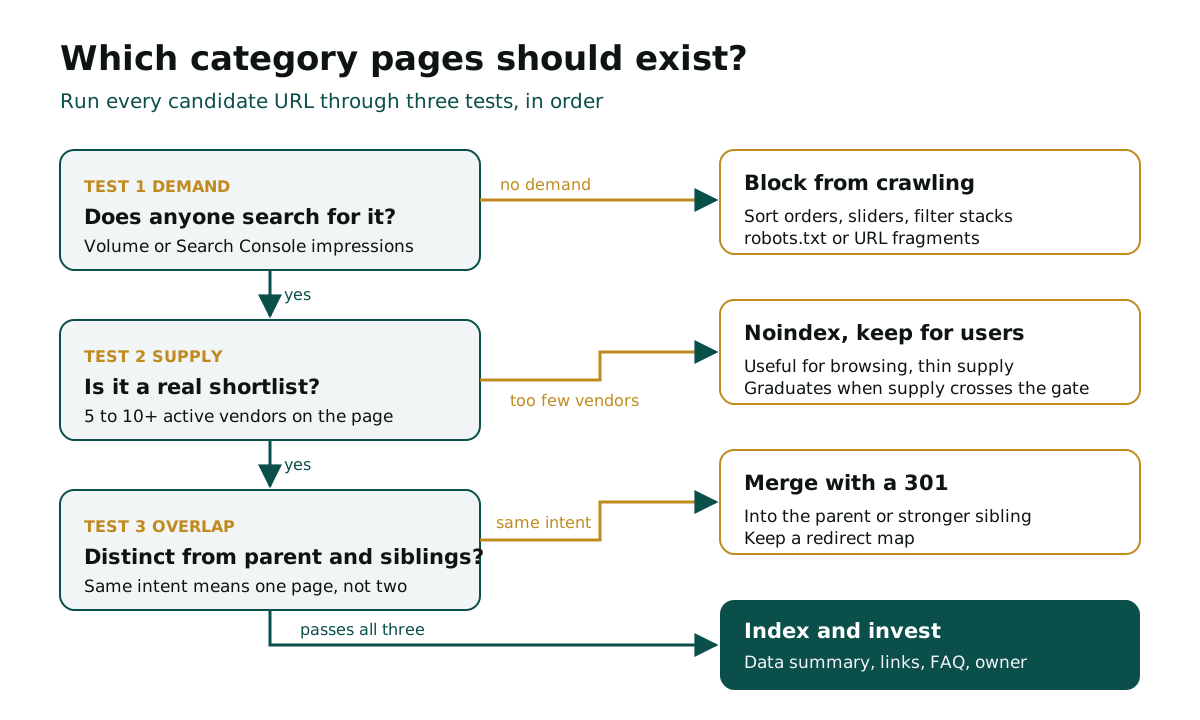
Run every candidate page through three tests:
- Demand: does anyone search for this combination? Check search volume and impressions in Search Console. Zero impressions after six months is a signal.
- Supply: does the page show enough live vendors to be a real shortlist? We use a floor of 5 to 10 active listings for most B2B categories.
- Overlap: is the page meaningfully different from its parent or a sibling? "CRM consultants" and "CRM consulting firms" are one page, not two.
Then apply one of four outcomes:
- Index and invest when demand and supply are both present and the page is distinct.
- Merge into the parent with a 301 redirect when two pages target the same intent.
- Noindex, keep for users when the page is useful for browsing but has no search demand or thin supply.
- Block from crawling when the URL is a filter or sort combination that nobody would ever search.
The decision tree at the top of this guide shows the order. Run it once across the whole catalogue, then on every new category before it launches. A marketplace that launches categories without supply creates empty pages that rank for a month, disappoint buyers and drag down the quality signals of the whole section.
Find out which category pages are costing you
We map every category URL against demand, supply and overlap and show you what to index, merge or retire.
On a mature marketplace, this first pass often cuts the indexable category set sharply. That feels like a loss. It is the opposite. Fewer, stronger pages concentrate links and crawl attention on the URLs that convert, and they stop vendors in thin categories from wondering why they pay for leads that never arrive. Keep the retired URLs in a redirect map so nothing that once earned links is lost.
Control faceted navigation and crawl
Faceted navigation is the filter panel: location, price band, industry, team size, certifications. Buyers need it. Search engines can drown in it.
Five filters with ten values each can produce hundreds of thousands of URL combinations, most of them duplicates with different sort orders. Google's own guidance on managing crawling of faceted navigation URLs is direct: if you don't need faceted URLs indexed, prevent them from being crawled, because overcrawling them wastes server resources and slows the discovery of new pages. Google also notes that rel="canonical" and rel="nofollow" are generally less effective in the long term than robots.txt rules or URL fragments.
For faceted navigation SEO on a B2B marketplace, we work from a simple rule set:
- Promote the facets with demand. One filter that matches a real search, such as location or a main service type, becomes a clean static URL with its own title and content. "Packaging suppliers in Poland" earns a page.
- Block the rest. Sort orders, price sliders, pagination parameters and multi-filter stacks stay out of crawl through robots.txt or fragments.
- Return a 404 for empty combinations. A filter that shows zero vendors should not return a 200 status with an empty grid.
- Keep filter order consistent. The same selection should always produce the same URL.
Check your server logs before and after. On a large marketplace, a healthy share of Googlebot hits should land on promoted category URLs and listings, not on parameter strings. If most of the crawl is going to filters, new vendor listings are waiting days or weeks to be found.
Write unique content from supply data
A category page with a heading and a grid of logos looks identical to the same page on three competing marketplaces. Google sees a duplicate. A buyer sees no reason to trust it. An AI assistant finds nothing to quote.
The fix is not 800 words of generic copy at the bottom of the page. The fix is data only you have. A marketplace sits on structured supply data, and each category page should surface it:
- A two-sentence definition of the category and who it serves.
- Live numbers: how many active vendors, the typical price or rate range, median response time, the most common certifications.
- Distribution: where the vendors are based, what size they are, which industries they serve most.
- Three to five real buyer questions, answered briefly, taken from what your sales and support teams already hear.
- A last updated date that changes when the numbers change.
Generate the numbers from your database and refresh them on a schedule. Write the definitions and answers by hand for your top categories. For a marketplace with 300 indexable categories, the top 50 usually justify human writing; the rest can use a well-built template fed by data, as long as every page carries at least one fact that differs from its siblings.
Ecommerce category page SEO works the same way, but B2B marketplaces have a stronger hand. Buyers in B2B care about price ranges, lead times and qualifications, and those are exactly the fields your vendors already fill in.
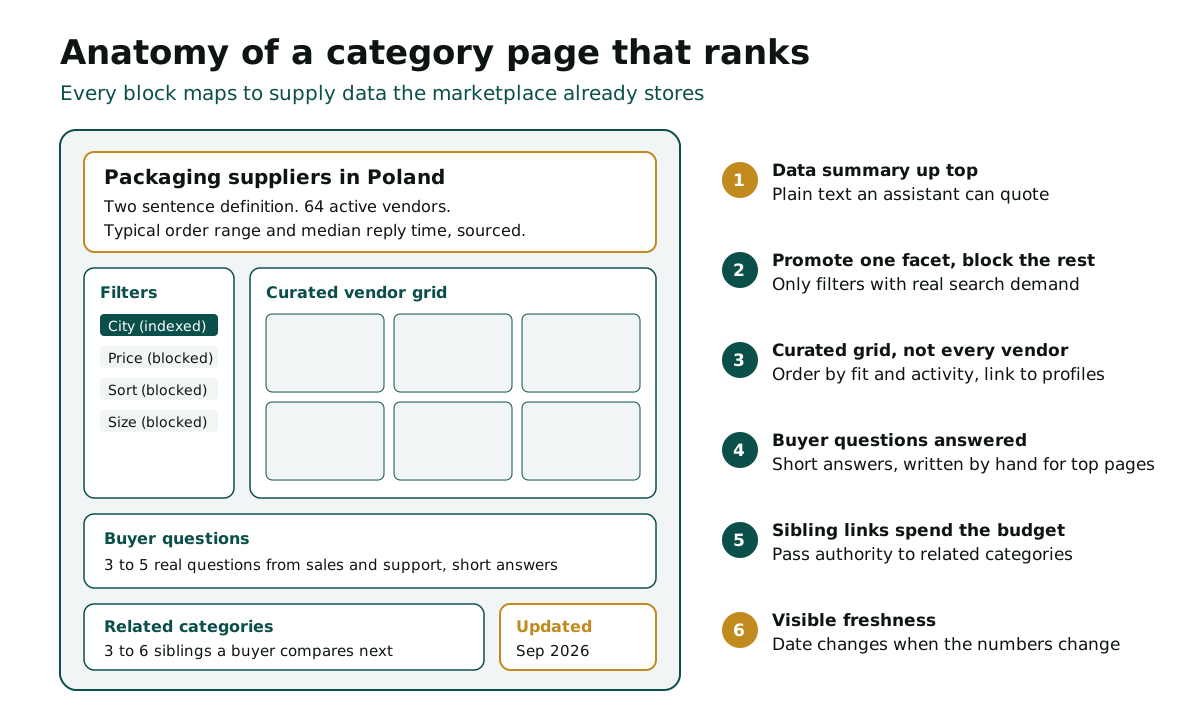
The anatomy above is also a template brief for your product team. Each block maps to a field you already store, so the work is mostly retrieval and layout rather than new writing.
Spend your internal linking budget
Internal links tell search engines which pages matter. Every page has a limited amount of link attention to pass on, so treat internal linking as a budget, not a decoration.
Most marketplaces spend it badly. The mega menu links to 200 categories from every page, so every category gets the same small share. Footer links repeat the same list. Listings link to nothing but their own contact form.
Reallocate it:
- Top navigation: your 10 to 20 highest revenue categories only. Not every category deserves a sitewide link.
- Parent to child: each parent category links to its strongest children, ordered by demand, not alphabetically.
- Child to sibling: each category links to three to six related categories a buyer would compare next.
- Listing to category: every vendor profile links back to the categories and locations it belongs to. With thousands of listings, this is the largest source of internal links you have.
- Content to category: every guide and report links to the category page it supports, with a descriptive anchor.
Then check the result. Crawl the site and sort categories by internal links received. If a category that drives 10% of your buyer requests sits below a category that drives none, the budget is in the wrong place.
Scale location and attribute pages safely
Programmatic pages are where marketplaces win or get penalised. "Marketing agencies in Manchester", "ISO 9001 machining suppliers", "water treatment contractors in Texas": combinations of category, location and attribute can match thousands of real searches.
They can also become doorway pages. Google's spam policies name scaled content abuse, where many pages are generated mainly to manipulate rankings rather than help users, and doorway abuse, explicitly including pages targeted at specific regions or cities that funnel users to one page. A marketplace that spins up 5,000 city pages with the same 12 vendors on each is building exactly that.
The line between a useful programmatic page and a doorway is supply. Use these gates before a combination page goes live:
- Supply gate: at least 5 to 10 vendors genuinely serve that location or hold that attribute. Not vendors who "cover nationwide".
- Difference gate: the vendor set overlaps less than half with the parent page and with the nearest sibling.
- Data gate: the page shows at least two numbers specific to the combination, such as local price range or vendor count.
- Demand gate: the combination has search volume or impressions, or it is a market you are actively building supply in.
Pages that fail stay live for browsing with a noindex tag, and graduate to indexable when supply crosses the gate. This turns programmatic SEO into a mirror of your supply strategy. When the vendor team recruits into a new region, the pages follow automatically.
Scale programmatic pages without the penalty risk
We design the supply, difference and demand gates for your location and attribute pages and wire them into your templates.
In our experience, this gated approach also fixes a commercial problem. Vendors stop paying for presence on pages that never send leads, and the sales team can point to real demand data when recruiting supply into a gap. The gate list becomes a shared document between SEO and supply: which combinations are close to qualifying, how many vendors each one still needs, and which regions to recruit into next quarter.
Three failure scenarios
These are the category page mistakes we see most often, with worked examples of what each one costs. Assume a marketplace where category pages bring 25,000 organic sessions a month, 2% of sessions become buyer requests, and each request is worth $120 in vendor fees.
1. The filter explosion. A redesign makes every filter combination crawlable. Indexed pages jump from 4,000 to 90,000 in a quarter. Crawl shifts to parameters, new listings take weeks to be found, and rankings on core categories soften. Lose 30% of category sessions and you lose 150 requests a month, or $18,000 a month in vendor value. The fix: block parameters, promote only the facets with demand.
2. The doorway rollout. A team generates 3,000 city pages from one template, each showing the same national vendors. Traffic rises for two months, then the section drops after a core update and drags down healthy pages with it. Rebuilding trust takes two to three quarters. The fix: supply gates before any combination page is indexed.
3. The silent merge. Two near-duplicate categories are merged without redirects during a migration. Links pointing at the retired URL return 404s, and the surviving page never inherits its rankings. The fix: map every retired URL to its closest live equivalent with a 301 and check the redirect list after launch.
None of these failures show up as an error in a CMS. They show up three months later as vendors asking why lead volume dropped.
Options compared: cost, risk and best for
There are four common ways to run category page SEO. The cost figures below are worked examples, assuming an external specialist at $150 an hour and an internal engineer at $90 an hour; your rates will differ.
| Approach | Cost (worked example) | Time to first signal | Main risk | Best for |
|---|---|---|---|---|
| Architecture clean up: index, merge, noindex | $8,000 to $15,000 one off | 4 to 8 weeks | Redirect mistakes during merges | Marketplaces with 500+ category URLs |
| Faceted navigation and crawl control | $5,000 to $12,000 one off | 2 to 6 weeks | Blocking a facet that had demand | Sites with filter driven URL growth |
| Supply data content on top categories | $3,000 to $6,000 a month | 6 to 12 weeks | Generic copy that adds nothing | Platforms with rich vendor data |
| Gated programmatic location pages | $10,000 to $25,000 build | 2 to 4 months | Doorway signals if gates are weak | Marketplaces with deep local supply |
| Do nothing | $0 upfront | Never | Slow loss of rankings and vendor churn | No one |
Most marketplaces should sequence these rather than pick one. Architecture and crawl control come first because they make every later investment work harder. Content and programmatic pages follow once the foundation stops leaking.
Make category pages visible in AI answers
Buyers now ask assistants for shortlists before they search. Which suppliers should I consider, what does this cost, which platform has the most vetted vendors. The assistant cites a handful of sources. Category pages are your best candidates, because they hold the specific, structured facts these engines prefer.
The research that named generative engine optimization, GEO: Generative Engine Optimization from researchers at Princeton University and IIT Delhi among others, found that adding statistics, quotations and cited sources raised a page's visibility in AI answers by up to 40%, while keyword stuffing lowered it. A category page with live vendor counts and price ranges already carries those statistics. It just needs to show them in readable text near the top.
Three changes make the biggest difference:
- Put the data summary in plain HTML, not inside tabs, images or scripts that load late.
- Name the source of every number ("based on 1,240 quotes on our platform in 2026").
- Allow AI search crawlers in robots.txt and your CDN settings, then decide separately about training crawlers.
We cover the full method in our guide to GEO for marketplaces, and in our generative engine optimization service for marketplaces. On a water and wastewater B2B marketplace, the same category and supply data work drove 10x+ organic impressions within six months, and those pages became the ones assistants quoted.
How to measure and where to start
Rankings alone will not tell you whether category pages are working. Track four numbers every month for your top 50 categories:
- Organic sessions to category pages, grouped by parent category.
- Buyer requests per category, from organic sessions specifically.
- Index coverage: indexed category URLs versus the set you decided should exist.
- AI citation coverage: whether your category pages are named or cited for a fixed list of 30 buyer questions in the main assistants.
Then start where the leak is largest:
- Indexed URLs more than twice your intended category set: fix faceted navigation and crawl first.
- Top 20 categories with no data summary: add live numbers and buyer questions this month.
- Mega menu linking to more than 50 categories: reallocate the internal linking budget.
- Planning a location or attribute rollout: set supply gates before a single page goes live.
If you want an outside view on the whole growth engine, not just search, our B2B marketplace consulting work starts with the same audit.
Turn your category pages into a lead engine
We audit your category architecture, crawl, content and AI visibility and give you a prioritized 90 day plan.
Here is the number for your next leadership meeting. In the worked example above, a 30% slide in category traffic costs $18,000 a month in vendor value, or $216,000 a year. Buying that traffic back with paid search at an assumed $4 a click for 7,500 sessions would cost $30,000 a month. A one off clean up in the $8,000 to $15,000 range pays back within the first month of recovered requests. The cost of doing nothing is paying, every month, for buyers your own pages should already be sending.
FAQ
What is category page SEO for a marketplace? It is the work of making the pages that group vendors by service, location or attribute rank for commercial searches. It covers which pages exist, crawl control, unique content, internal links and AI visibility.
Should every filter combination have its own indexable page? No. Promote the few facets that match real searches, such as location or main service type, and block sort orders, price sliders and multi filter stacks from crawling.
How many vendors does a category page need before it is indexed? We use a floor of 5 to 10 active listings for most B2B categories. Below that, keep the page live for browsing with a noindex tag until supply grows.
Are programmatic location pages risky? They are if they show the same vendors and copy on every city page. Google treats that as doorway or scaled content abuse. Gate each page on real local supply and local data.
How much content should a category page have? Enough to be useful, not a set word count. A short definition, live vendor numbers, price ranges and three to five buyer questions beat long generic copy at the bottom of the page.
How long does category page SEO take to show results? Crawl and architecture fixes often show within four to eight weeks. Content and programmatic work usually takes two to four months to move rankings and buyer requests.
Related Articles
This guide is part of B2B Marketplace Growth, Digica's hub on supply acquisition, demand generation, liquidity and monetization for B2B marketplaces.
← All insights